Inference stays local.
Chat and image understanding run on your Mac. Optional dictation uses a separate local speech model.
Install Minutus, download a model, and run your own AI on your Mac.
Chat, understand images, and work with your files using local inference.
32 GB unified memory recommendedApple Silicon · macOS 13.3+ · Models downloaded separately
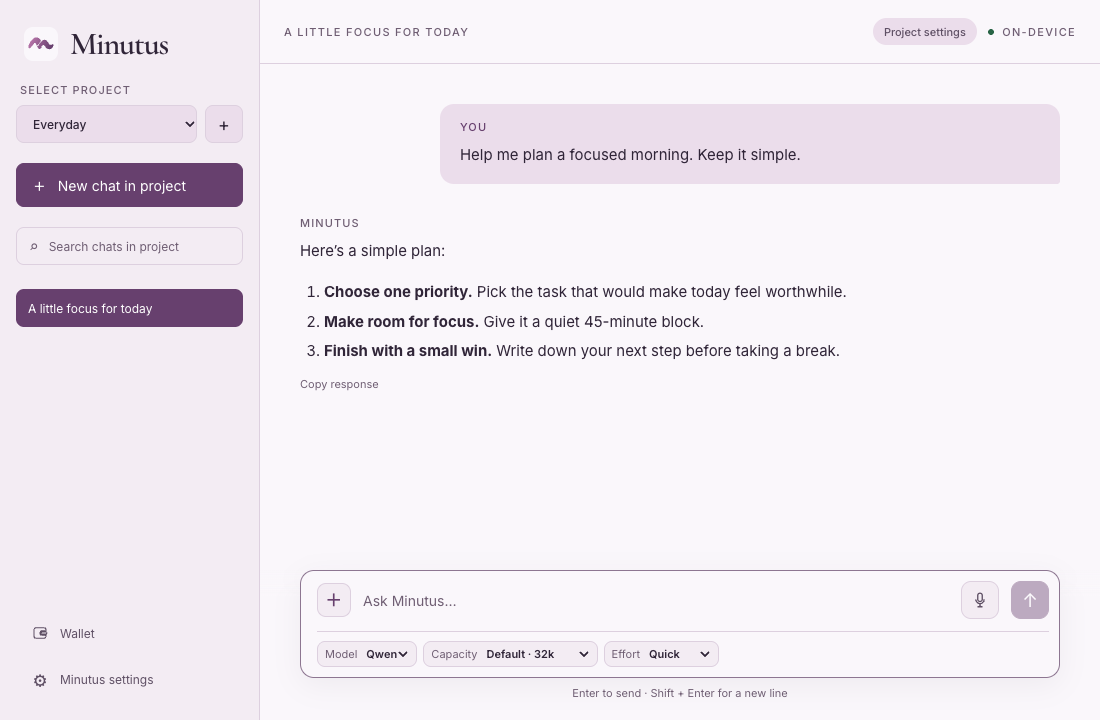
Actual interface · scripted sample conversation
EXAMPLES
Local work, with external tools
when you choose to use them.
Give Minutus access to a project folder. Extract decisions, list open questions, or draft next steps using local inference.
“Read these meeting notes. List the decisions and action items.”File access stays within your granted scope.
Attach a screenshot and ask what it means. Get an explanation or a suggested next step with image understanding on your Mac using the matching vision module.
“What does this import error mean, and what should I try next?”Image understanding runs locally.
Retrieve public documentation when a task needs information beyond your local files. Review the destination before retrieval, then keep the source references with the answer.
“Read these release notes and list the changes that affect this project.”Web features contact external services.
Use supported public x402 services as part of a task. Review the request, then separately approve the payment in a native dialog.
“Use this x402 endpoint for the task. Show me the payment request for review.”USDC on Base mainnet.Compatibility details
Request → review → approve or cancel
HOW IT WORKS
Chat and image understanding run on your Mac. Optional dictation uses a separate local speech model.
You choose which workspace Minutus can access. The app enforces file permissions independently of model output. Folder access starts read-only.
Supported x402 requests use separate native request and payment review. Current compatibility is USDC on Base mainnet.
x402 compatibilityModel downloads, web tools, and other optional network features contact external services. How privacy works
MAC & RAM REQUIREMENTS
Apple Silicon · macOS 13.3+
RAM is separate from disk space.
For the current model catalogue, we recommend a Mac with 32 GB of RAM. The model and context length affect how much memory you need.
8 GB and 16 GB Macs are below the current catalogue’s base recommendations.
| Model | Base recommendation |
|---|---|
| Qwen3.8 27B GGUF · recommended | 30 GiB |
| Muse Glimmer 30B GGUF | 24 GiB |
Vision and draft modules can add 2 GiB each where applicable. Longer context and other apps need additional headroom. These are recommendations, not a verified minimum.
Complete model bundles are about 16.5 GiB for Qwen and 18.4 GiB for Glimmer, including declared companions. Allow additional disk space for the app and runtimes. Experimental MLX is disabled in release builds.
GETTING STARTED
Build MinutusGet the source on GitHub and follow the README.
Open your local buildLaunch the built app to begin setup.
Add a modelDownload a supported model in Minutus, or import matching local files.
MINUTUS ON GITHUB
Get the source on GitHub and follow the README to build locally.
Build from source32 GB unified memory recommendedApple Silicon · macOS 13.3+ · Models installed separately